In this section I detail how I run Moana fully automated, without intervention for multiple nights in a row, with NINA.
Prerequisite
The following items, although not mandatory make things easy and safer:
- Safety monitor: at the observatory, the roof scheduler (ie: the device responsible for opening and closing the roof) writes the roof status (open or closed) in a text file accessible on the network. Every computer in the observatory has read access to this shared file. Then, the ASCOM Generic File Safety Monitor can be installed and configured to read roof status from that text file. From there, NINA connects to the safety monitor, and knows the roof status. It is then easy to program triggers, for example stop imaging and park, if the roof suddenly closes. Here is my config file for the safety monitor.
- Web Power Switch ASCOM driver: most people doing remote imaging use a PDU from “Digital Loggers, Inc.”. The huge advantage of this particular device versus other is it has an ASCOM driver. The PDU can be used to remotely switch on/off 110v AC outlets. I have been using 3 ways to interact with the PDU. The first is via the aforementioned ASCOM driver, so once connect to the driver in NINA, it is easy to switch on the various devices at start up (mount, camera train, etc…) and switch them off at the end of the session, via NINA Switches. The 2nd way to interact with the device is via http, simply in a web browser. The observatory has a static IP, and the router of the observatory is configured so that accessing this IP on a particular port forwards to my PDU. With this, the PDU is accessible from anywhere in the world, at any time, even from a cell phone. I typically use this for manual start up and manual shut down. In case a static IP is not possible, one could configure a service like DynDns. The 3rd way to interact with the PDU is via Python script. At the end of each session, I run a script, which, amongst many things, checks the status of the various PDU outlets and performs hard shut down if needed (this is the last layer of safety if everything else has failed). A few notes: rather than using the PDU over ASCOM, many people use a Pegasus Power Box. The PDU switches 110v AC, while the PPB switches 12v DC. I believe ASCOM allows at this point only 1 Switch at a time. So to use both, I interact with the Pegasus box via ASCOM, and with the PDU via “run script”, and run a Python script for each specific action. Here are the switch on and switch off scripts. This work around allows to use 2 different set of Switches in NINA, when only one set is possible with ASCOM.
- Weather service: I have a weather service configured in ASCOM as well. At the very least it updates the images’ fit headers with weather info. In some case it could be used to trigger a particular behavior. In practice I rely on the roof scheduler for that, the roof scheduler relying in turn on the local weather station.
NINA sequence
The NINA sequence (availble to download from the link below) is structured with an infinite loop, one iteration every day.
In the loop:
- a startup sequence,
- some imaging (either with the Scheduler or the Sequencer),
- a shut down sequence, and
- a “handle transition to next day” sequence.
Let’s review each part:
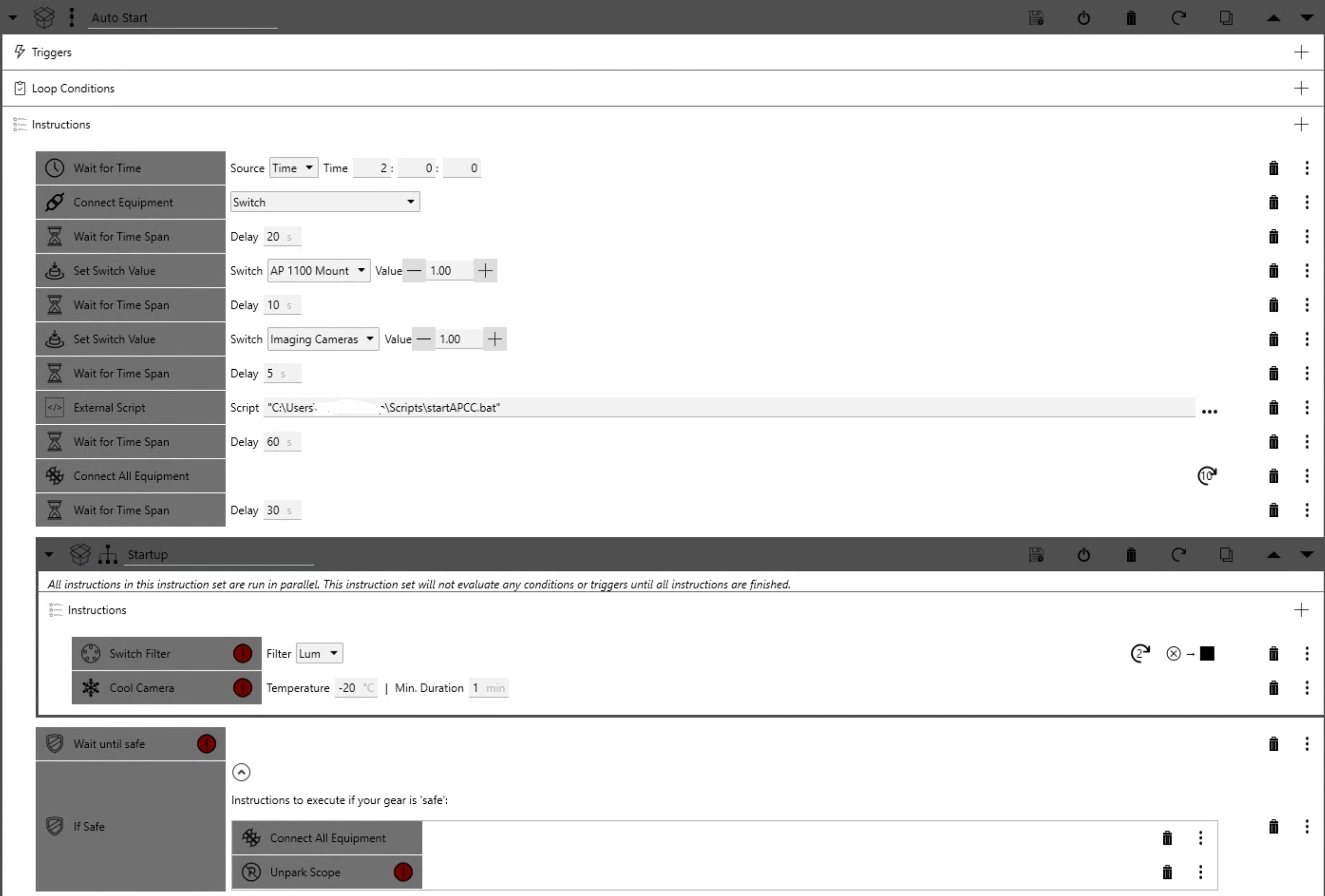
- The start up is pretty straight forward: connect to the switch, wait 20s, and power up the mount, then the camera. Then start the mount software (APCC), here via a script (as I do not care paying a subscription just to have the NINA “start APCC” module). Then connect all equipment (imaging camera, guider, filter wheel, mount and focuser) in ASCOM. Then set the filter to Luminance, for the first plate solve and focusing of the night and cool the camera. After that, if conditions are safe (roof open), move to imaging.
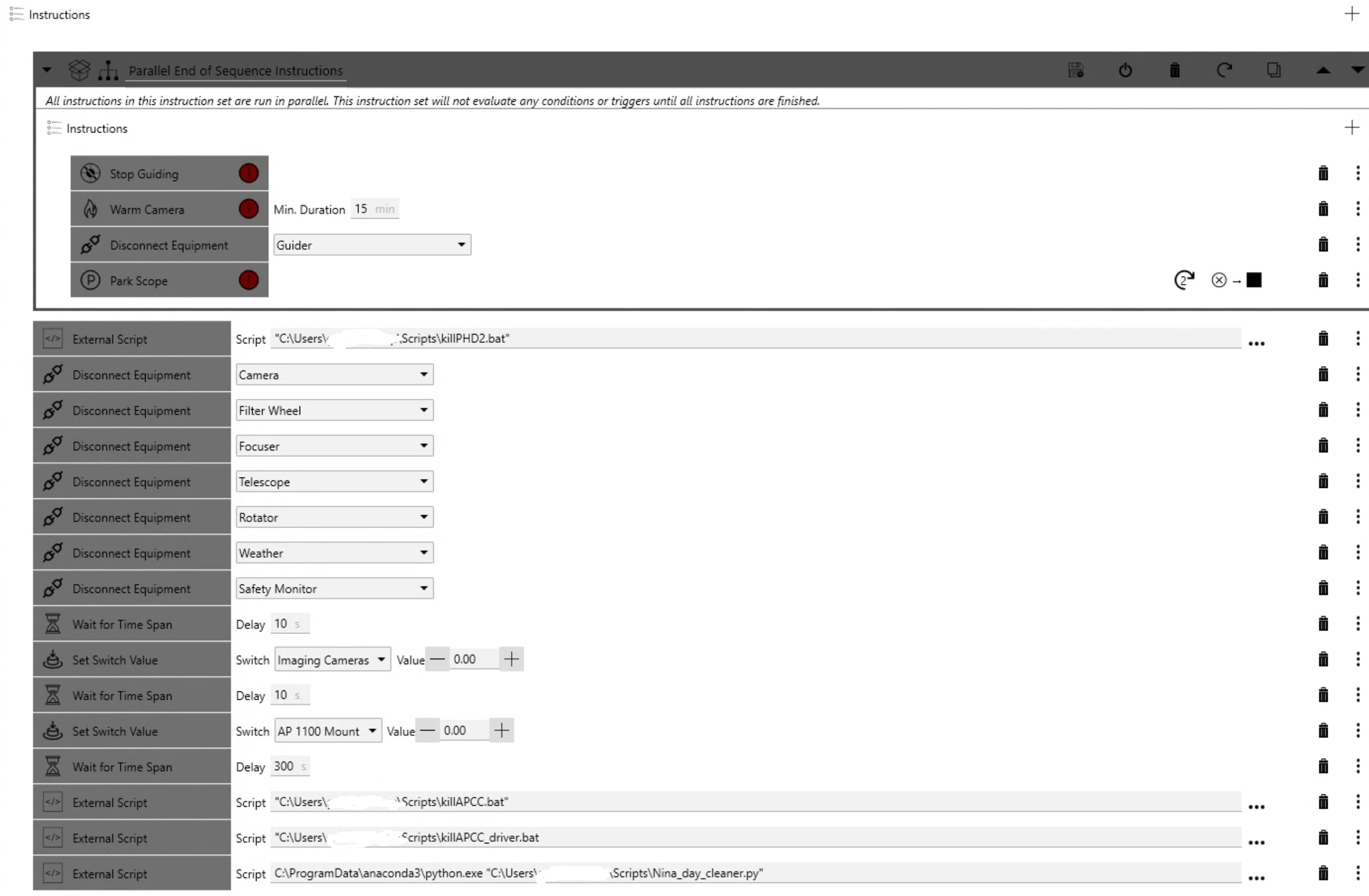
- The shut down is pretty simple as well. In parallel stop guiding, warm the camera, disconnect the guider and park the scope. Then shut down the guide software (I just kill PHD2, as it seems there is no graceful exit). Then we need to disconnect the equipment. A “disconnect all” would not work, as it would disconnect the PDU as well, making it impossible to shut down the power to the equipment. So unfortunately each ASCOM driver must be shut down individually. Once the ASCOM drivers have been disconnected, one can power off each individual component and kill the mount software via script. The last script, written in Python, automatically detects and remove bad frames (based on the optional NINA log), in particular eliminating frames with bad guiding, no stars or poor seeing/focus solution (large FWHM). Then that scripts performs clean up, back up, move files and start synchronization with the remote server. Last it performs watch dog functions and forcibly kills or hard shut down any equipment still up at that point.
- The next item is to wait until NINA transitions to the next day. The definition of “day” has changed in NINA a few times, so you would have to see what works with your version.